Hive
Hive 是构建在 Hadoop 之上的数据仓库工具。它做的事情本质上只有一件:把 SQL 翻译成分布式计算任务(MapReduce / Tez / Spark),让熟悉 SQL 的人不用写 Java 就能处理 HDFS 上的海量数据。它不是数据库,而是一个「SQL 到分布式计算」的翻译层 + 一套元数据管理。数据本身存在 HDFS 上,计算由别的引擎完成,Hive 提供的是表结构定义和 SQL 接口。
1、用户接口:CLI、JDBC/ODBC、WebUI,负责接收 SQL。
2、元数据(Metastore):记录表名、列名和类型、分区信息、表属性、数据在 HDFS 上的存储路径等。元数据存在关系型数据库里(通常是 MySQL),而不是 HDFS 上——因为元数据需要频繁随机读写和事务支持,HDFS 不擅长这个。Metastore 挂了整个 Hive 就用不了,所以生产上它是重点保障对象。
3、Driver(驱动引擎):整个翻译过程的核心,把一条 HQL 变成可执行的分布式任务:
| 1 | HQL → 解析器(词法/语法分析,生成 AST) |
| 2 | → 编译器(生成逻辑执行计划) |
| 3 | → 优化器(谓词下推、分区裁剪、列裁剪等) |
| 4 | → 执行器(提交给 MapReduce / Tez / Spark 运行) |
分区表实际上就是对应一个HDFS文件系统上的独立的文件夹,该文件夹下是该分区所有的数据文件。Hive中的分区就是分目录,把一个大的数据集根据业务需要分割成小的数据集。在查询时通过WHERE子句中的表达式选择查询所需要的指定的分区,这样的查询效率会提高很多。
1)入分区表(需要根据日期对日志进行管理)
| 1 | /user/hive/warehouse/log_partition/20170702/20170702.log |
| 2 | /user/hive/warehouse/log_partition/20170703/20170703.log |
| 3 | /user/hive/warehouse/log_partition/20170704/20170704.log |
2)创建分区表语法
| 1 | hive (default)> create table dept_partition( |
| 2 | deptno int, dname string, loc string |
| 3 | ) |
| 4 | partitioned by (month string) |
| 5 | row format delimited fields terminated by '\t'; |
注意:分区字段不能是表中已经存在的数据,可以将分区字段看作表的伪列。
3)加载数据到分区表中
| 1 | hive (default)> load data local inpath '/opt/module/datas/dept.txt' into table default.dept_partition partition(month='201709'); |
| 2 | hive (default)> load data local inpath '/opt/module/datas/dept.txt' into table default.dept_partition partition(month='201708'); |
| 3 | hive (default)> load data local inpath '/opt/module/datas/dept.txt' into table default.dept_partition partition(month='201707'); |
注意:分区表加载数据时,必须指定分区
4)查询分区表中数据
| 1 | hive (default)> select * from dept_partition where month='201709'; |
5)增加分区
创建单个分区
| 1 | hive (default)> alter table dept_partition add partition(month='201706') ; |
同时创建多个分区
| 1 | hive (default)> alter table dept_partition add partition(month='201705') partition(month='201704'); |
6)删除分区
删除单个分区
| 1 | hive (default)> alter table dept_partition drop partition (month='201704'); |
同时删除多个分区
| 1 | hive (default)> alter table dept_partition drop partition (month='201705'), partition (month='201706'); |
7)查看分区表有多少分区
| 1 | hive> show partitions dept_partition; |
8)查看分区表结构
| 1 | hive> desc formatted dept_partition; |
| 2 | |
| 3 | # Partition Information |
| 4 | # col_name data_type comment |
| 5 | month string |
1)创建二级分区表
| 1 | hive (default)> create table dept_partition2( |
| 2 | deptno int, dname string, loc string |
| 3 | ) |
| 4 | partitioned by (month string, day string) |
| 5 | row format delimited fields terminated by '\t'; |
2)正常的加载数据
(1)加载数据到二级分区表中
| 1 | hive (default)> load data local inpath '/opt/module/datas/dept.txt' into table default.dept_partition2 partition(month='201709', day='13'); |
(2)查询分区数据
| 1 | hive (default)> select * from dept_partition2 where month='201709' and day='13'; |
3)把数据直接上传到分区目录上,让分区表和数据产生关联的三种方式
(1)方式一:上传数据后修复
上传数据
| 1 | hive (default)> dfs -mkdir -p /user/hive/warehouse/dept_partition2/month=201709/day=12; |
| 2 | hive (default)> dfs -put /opt/module/datas/dept.txt /user/hive/warehouse/dept_partition2/month=201709/day=12; |
查询数据(查询不到刚上传的数据)
| 1 | hive (default)> select * from dept_partition2 where month='201709' and day='12'; |
执行修复命令
| 1 | hive> msck repair table dept_partition2; |
再次查询数据
| 1 | hive (default)> select * from dept_partition2 where month='201709' and day='12'; |
(2)方式二:上传数据后添加分区
上传数据
| 1 | hive (default)> dfs -mkdir -p /user/hive/warehouse/dept_partition2/month=201709/day=11; |
| 2 | hive (default)> dfs -put /opt/module/datas/dept.txt /user/hive/warehouse/dept_partition2/month=201709/day=11; |
执行添加分区
| 1 | hive (default)> alter table dept_partition2 add partition(month='201709', day='11'); |
查询数据
| 1 | hive (default)> select * from dept_partition2 where month='201709' and day='11'; |
(3)方式三:创建文件夹后load数据到分区
创建目录
| 1 | hive (default)> dfs -mkdir -p /user/hive/warehouse/dept_partition2/month=201709/day=10; |
上传数据
| 1 | hive (default)> load data local inpath '/opt/module/datas/dept.txt' into table dept_partition2 partition(month='201709',day='10'); |
查询数据
| 1 | hive (default)> select * from dept_partition2 where month='201709' and day='10'; |
分区提供一个隔离数据和优化查询的便利方式。不过,并非所有的数据集都可形成合理的分区。对于一张表或者分区,Hive 可以进一步组织成桶,也就是更为细粒度的数据范围划分。
- 分桶是将数据集分解成更容易管理的若干部分的另一个技术。
- 分区针对的是数据的存储路径;分桶针对的是数据文件。
- 分桶规则:根据结果可知:Hive的分桶采用对分桶字段的值进行哈希,然后除以桶的个数求余的方式决定该条记录存放在哪个桶当中。
| 压缩格式 | 工具 | 算法 | 文件扩展名 | 是否可切分 |
|---|---|---|---|---|
| DEFLATE | 无 | DEFLATE | .deflate | 否 |
| Gzip | gzip | DEFLATE | .gz | 否 |
| bzip2 | bzip2 | bzip2 | .bz2 | 是 |
| LZO | lzop | LZO | .lzo | 是 |
| Snappy | 无 | Snappy | .snappy | 否 |
开启map输出阶段压缩可以减少job中map和Reduce task间数据传输量。具体配置如下:
(1)开启hive中间传输数据压缩功能
| 1 | hive (default)>set hive.exec.compress.intermediate=true; |
(2)开启mapreduce中map输出压缩功能
| 1 | hive (default)>set mapreduce.map.output.compress=true; |
(3)设置mapreduce中map输出数据的压缩方式
| 1 | hive (default)>set mapreduce.map.output.compress.codec= org.apache.hadoop.io.compress.SnappyCodec; |
(4)执行查询语句
| 1 | hive (default)> select count(ename) name from emp; |
当Hive将输出写入到表中时,输出内容同样可以进行压缩。属性hive.exec.compress.output控制着这个功能。用户可能需要保持默认设置文件中的默认值false,这样默认的输出就是非压缩的纯文本文件了。用户可以通过在查询语句或执行脚本中设置这个值为true,来开启输出结果压缩功能。
(1)开启hive最终输出数据压缩功能
| 1 | hive (default)>set hive.exec.compress.output=true; |
(2)开启mapreduce最终输出数据压缩
| 1 | hive (default)>set mapreduce.output.fileoutputformat.compress=true; |
(3)设置mapreduce最终数据输出压缩方式
| 1 | hive (default)> set mapreduce.output.fileoutputformat.compress.codec = org.apache.hadoop.io.compress.SnappyCodec; |
(4)设置mapreduce最终数据输出压缩为块压缩
| 1 | hive (default)> set mapreduce.output.fileoutputformat.compress.type=BLOCK; |
(5)测试一下输出结果是否是压缩文件
| 1 | hive (default)> insert overwrite local directory |
| 2 | '/opt/module/datas/distribute-result' select * from emp distribute by deptno sort by empno desc; |
Hive支持的存储数据的格式主要有:TEXTFILE 、SEQUENCEFILE、ORC、PARQUET。
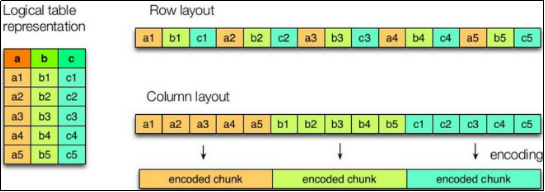
如图所示左边为逻辑表,右边第一个为行式存储,第二个为列式存储。
1)行存储的特点
查询满足条件的一整行数据的时候,列存储则需要去每个聚集的字段找到对应的每个列的值,行存储只需要找到其中一个值,其余的值都在相邻地方,所以此时行存储查询的速度更快。
2)列存储的特点
因为每个字段的数据聚集存储,在查询只需要少数几个字段的时候,能大大减少读取的数据量;每个字段的数据类型一定是相同的,列式存储可以针对性的设计更好的设计压缩算法。
TEXTFILE 和 SEQUENCEFILE 的存储格式都是基于行存储的;
ORC 和 PARQUET 是基于列式存储的。
默认格式,数据不做压缩,磁盘开销大,数据解析开销大。可结合 Gzip、Bzip2 使用,但使用 Gzip 这种方式,hive 不会对数据进行切分,从而无法对数据进行并行操作。
Orc (Optimized Row Columnar)是Hive 0.11版里引入的新的存储格式。
如下图所示可以看到每个Orc文件由1个或多个stripe组成,每个stripe一般为HDFS的块大小,每一个stripe包含多条记录,这些记录按照列进行独立存储,对应到Parquet中的row group的概念。每个Stripe里有三部分组成,分别是Index Data,Row Data,Stripe Footer:
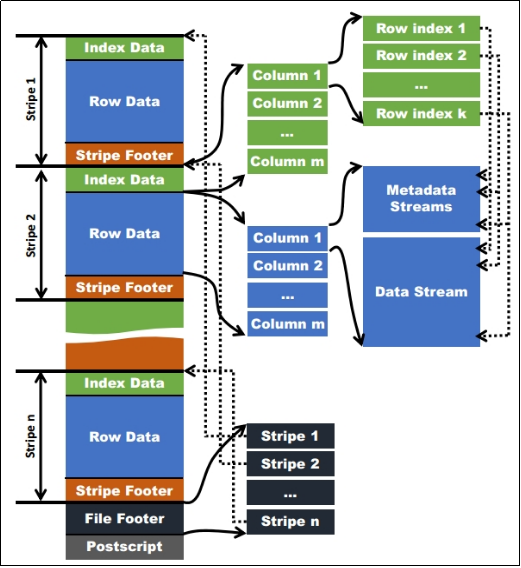
1)Index Data:一个轻量级的index,默认是每隔1W行做一个索引。这里做的索引应该只是记录某行的各字段在Row Data中的offset。
2)Row Data:存的是具体的数据,先取部分行,然后对这些行按列进行存储。对每个列进行了编码,分成多个Stream来存储。
3)Stripe Footer:存的是各个Stream的类型,长度等信息。
每个文件有一个File Footer,这里面存的是每个Stripe的行数,每个Column的数据类型信息等;每个文件的尾部是一个PostScript,这里面记录了整个文件的压缩类型以及FileFooter的长度信息等。在读取文件时,会seek到文件尾部读PostScript,从里面解析到File Footer长度,再读FileFooter,从里面解析到各个Stripe信息,再读各个Stripe,即从后往前读。
登录后可以选中正文添加批注(仅自己可见)。
评论 (0)
登录后参与评论。
还没有评论,来做第一个。